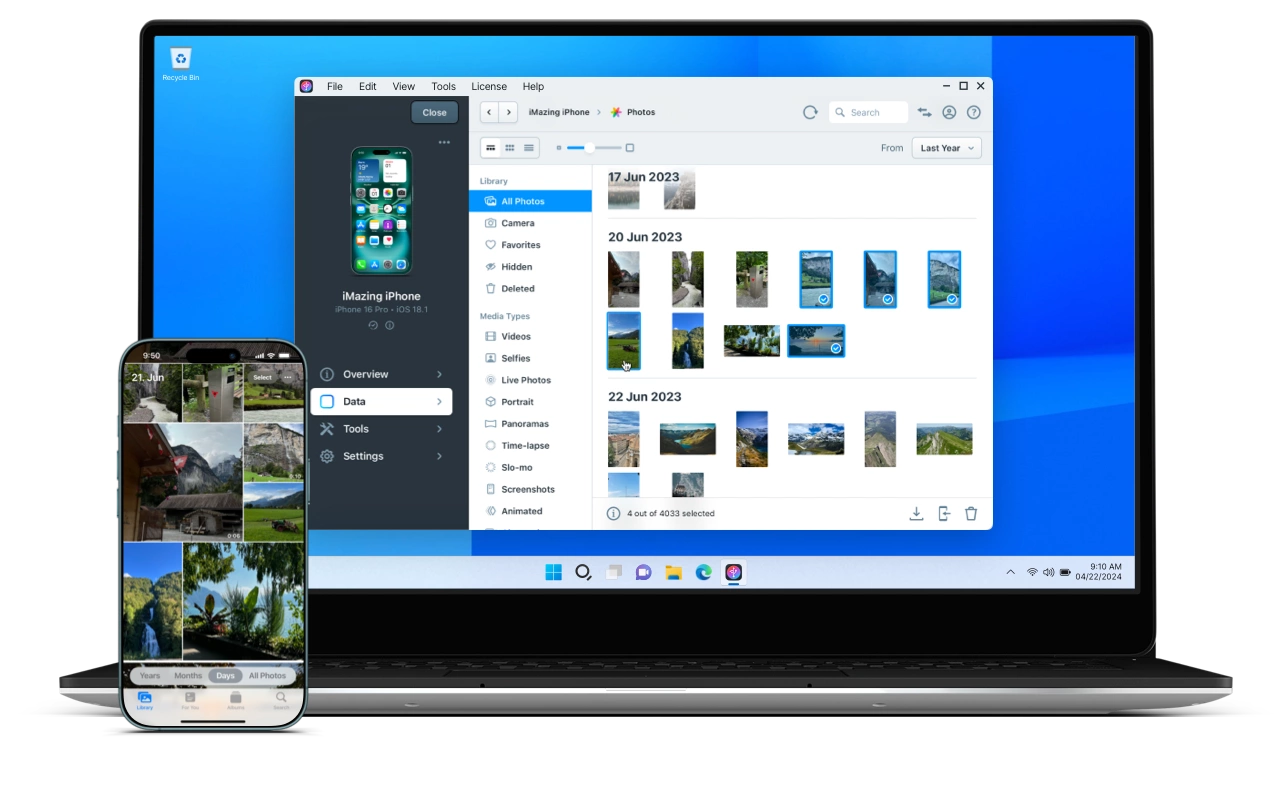
Managing your iPhone or iPad can sometimes feel like a chore. The limitations of iTunes, iCloud storage caps, and confusing interfaces often leave users frustrated. But what if there was a smarter, faster, and easier way to manage all your iOS data — including backups, transfers, messages, photos, apps, and more — without relying on iTunes or the cloud?
That’s where iMazing comes in.
iMazing is an advanced iOS device management software designed to make iPhone and iPad control simple, safe, and powerful — whether you’re a casual user or a tech professional. It works on both Windows and macOS, giving you complete control over your iOS devices from your computer.
What Is iMazing?
Put simply, iMazing is a comprehensive tool that helps you manage every aspect of your iPhone, iPad, or iPod effortlessly — from backups and restores to data transfers and app management. Unlike iTunes, it doesn’t limit you to full device syncs or forced cloud storage. Instead, it empowers you to choose exactly what you want to do with your device’s content.
Key Things You Can Do With iMazing
- 📱 Backup & Restore Your iOS Device
Create full or selective backups of your iPhone or iPad and restore them when you need — without overwriting everything. This means you can save only what matters most like messages, photos, or app data. - 🔄 Transfer Files Between Devices & Computers
Move photos, videos, music, documents, and more between your iOS device and computer with simple drag‑and‑drop ease — no iTunes restrictions. - 💬 Export or Archive Text Messages, WhatsApp & More
Save your SMS, iMessage, WhatsApp conversations, and attachments as PDFs, CSV files, or text files — perfect for backups, records, or printing. - 📦 App Management
Install, uninstall, back up, or restore apps and their associated data directly from your computer. This gives you far more control than Apple’s default options. - 🔄 Migrate to a New iPhone
When you get a new device, iMazing lets you transfer all your data, settings, and apps seamlessly so you never lose anything. - 🔐 Secure & Encrypted Backups
iMazing encourages encrypted backups that protect your personal information using strong AES‑256 encryption. - 📊 Detailed Device Info & Diagnostics
Get insights into battery health, storage usage, system logs, and other technical details that Apple doesn’t make easy to see.
Why iMazing Is Better Than iTunes
For years, Apple users depended on iTunes (or Finder on macOS) to back up, restore, or transfer data. But iTunes has limitations:
- 👎 Full backups only — no selective control
- 👎 Reliance on cloud storage or slow syncs
- 👎 Confusing interface for advanced tasks
With iMazing, these pain points are resolved. You get freedom and flexibility without the iTunes frustration. It’s a standalone solution that doesn’t require iTunes to be installed or opened.
Real‑World Scenarios Where iMazing Shines
Let’s look at practical ways users benefit from iMazing every day.
📱 Switching to a New iPhone Without Losing Anything
Upgrading to a new iPhone should be exciting — not stressful. With iMazing, instead of relying on iCloud or iTunes, you can move everything you need, including app data and settings, in just a few clicks. This makes device setup faster and smoother.
💾 Backing Up Precious Memories
Whether it’s photos from a family trip or important work documents, losing data can be heartbreaking. iMazing lets you back up exactly what you want — even just your photo library, messages, or specific app data — saving time and storage space.
📤 Exporting Messages & Conversations for Work or Legal Use
Need to keep a record of WhatsApp chats or SMS for legal, business, or personal reasons? iMazing can export entire conversation histories — including media — into formats that are easy to read or store.
🛠 Professional Use for IT & Device Management Teams
In businesses, schools, or tech support environments, managing multiple iOS devices can be overwhelming. iMazing helps IT admins:
- Back up multiple devices
- Deploy settings and apps
- Monitor battery and health data
- Restore devices efficiently
This makes professional device management much simpler and more efficient.
Security & Privacy — A Priority
iMazing takes your data’s safety seriously. Here’s how it protects you:
- 🔐 No Data Sharing or Monetization — iMazing doesn’t collect or sell your personal data.
- 🛡️ Encrypted Local Storage — Backups are encrypted with industry‑leading AES‑256 encryption.
- 🔒 Secure Connections — All communications use secure protocols without jailbreaking your device.
- 🧠 Privacy‑First Design — Your data stays local, not in the cloud, ensuring complete ownership and control.
This means even if someone else gains access to your computer, the encrypted backups remain protected.
What Users Are Saying
Real user reviews show that iMazing is both powerful and helpful:
⭐ “One of the best iOS device managers I have seen. Truly amazing and worth every penny. Great user interface and features.”
⭐ “Very good experience. Support was responsive and solved my issue quickly.”
Users often praise its ease of use and responsive customer support — making it a trusted choice globally.
Pricing & Availability
iMazing offers a free trial version so you can test basic features before buying. The full version unlocks advanced capabilities like unlimited backups, app management, and device migrations.
Current licensing options include:
- Personal Use License — Works on multiple devices
- Family License — Ideal for households with many devices
- Business/Multi‑User Plans — Designed for IT professionals or organizations
You can install iMazing on both Windows and Mac computers and manage your devices with or without a subscription, depending on your chosen plan.
Pros & Cons
✅ Pros
- Full control over backups, restores, and transfers
- Works independently of iTunes or Finder
- Export messages, contacts, and chat backups
- Secure encrypted backups
- Supports device migration seamlessly
- Works on Windows & macOS
❌ Cons
- Some advanced features require the paid version
- Not available on Linux
- Occasional user reports of interface challenges (rare)
Conclusion
Whether you’re an everyday iPhone user, a power user, or a professional managing multiple devices, iMazing gives you complete control over your iOS ecosystem. With powerful backups, intuitive file transfers, selective data management, and industry‑leading security, it replaces outdated tools like iTunes and cloud‑only solutions with something far more flexible and user‑friendly.
iMazing is the smart choice for anyone who wants total control over their iPhone or iPad — without the frustration of traditional methods.