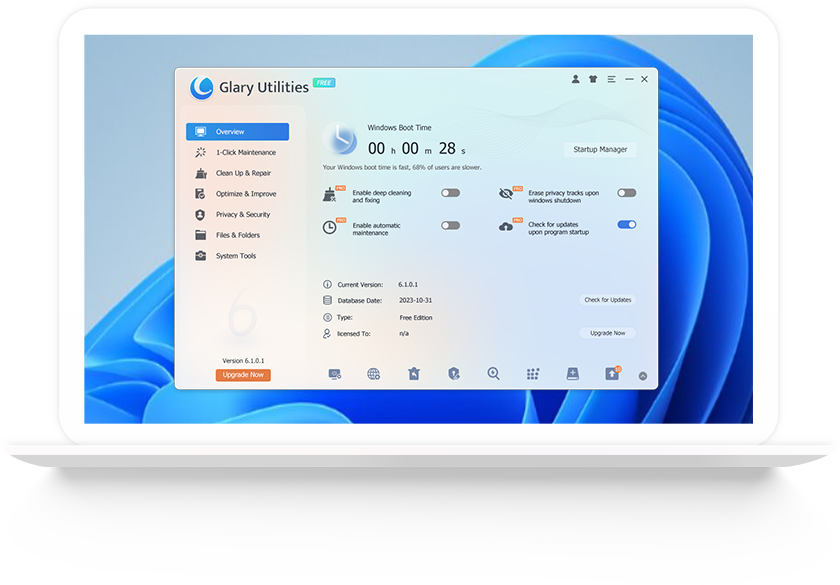
In today’s digital age, computers often slow down over time due to accumulated junk files, fragmented disks, unwanted software, and privacy issues. Whether you’re a home user, student, professional, or business owner, a slow PC can be frustrating and costly. This is where GlarySoft steps in — a trusted software company that delivers powerful, simple, and reliable tools to optimize, clean, and protect your Windows PC.
What is GlarySoft?
GlarySoft is a software development company focused on creating system utilities and optimization tools that enhance Windows performance, security, and user experience. Founded with a vision to help users globally maintain their computers with ease, GlarySoft has grown into a well‑known name in PC optimization.
Their flagship product, Glary Utilities, is one of the most downloaded and highly rated system utility suites available today. It combines dozens of tools into one simple platform — making it easy for both tech beginners and advanced users to keep PCs running fast and error‑free.
Why Your PC Needs Optimization
Before diving deeper into GlarySoft’s features, it’s important to understand why PC optimization matters:
- Junk file accumulation: Everyday computer use builds temporary and unnecessary files that slow down performance.
- Registry errors: Over time, the Windows Registry gets cluttered with invalid entries that degrade system stability.
- Startup overload: Too many programs launching at startup can make your system boot slowly.
- Security risks: Privacy files, browser traces, and unused applications leave your system vulnerable.
- Fragmented data: File fragmentation makes your hard drive less efficient.
With these challenges, a comprehensive utility suite like Glary Utilities can bring dramatic improvements in speed, responsiveness, and reliability.
Upgrade to Glary Utilities Pro
Key Features of GlarySoft and Glary Utilities
GlarySoft’s software lineup delivers a rich set of tools designed to enhance every aspect of PC performance and security. Here are the most valuable features users love:
1. One‑Click Maintenance
Glary Utilities offers a One‑Click Maintenance feature that automatically finds and fixes common PC issues with a single click. It saves time and simplifies optimization — perfect for users who want results without extra effort.
2. Disk Cleanup and Repair Tools
- Junk File Cleaner: Removes unnecessary temporary files, logs, and caches.
- Registry Cleaner: Fixes invalid entries to boost system stability.
- Duplicate File Finder: Locates duplicate files that waste disk space.
3. Startup Manager
Too many apps launching on startup can significantly slow boot‑up times. GlarySoft lets you enable/disable startup items to speed up the boot process.
4. Uninstall and Software Manager
Uninstall programs cleanly and track installed software. The built‑in Software Manager helps you update outdated applications.
5. Privacy & Security Tools
Protect your privacy with features that:
- Clean browser traces and activity history
- Securely erase files so they are unrecoverable
- Shield your personal information from unauthorized access
6. File Management Utilities
Glary Utilities includes tools like:
- File Shredder
- File Encrypter/Decrypter
- Empty Folder Finder
- Batch File Renamer
These make file management easier and more secure.
7. Performance Boosters
From memory optimization to system tweaks, tools are designed to improve overall performance and responsiveness.
User Experience: Why People Love GlarySoft
One of the reasons GlarySoft is recommended by tech sites and users is its user‑friendly interface. Even beginners find it easy to navigate the dashboard and run maintenance tasks effectively.
✔ Clean and Intuitive Design
The interface organizes tools into clear categories, making it easy to find what you need — without confusion.
✔ Fast Scanning and Optimization
Glary Utilities performs scans quickly and displays results that are easy to understand. Users appreciate how efficiently it finds issues and suggests fixes.
✔ Flexible for All Users
Whether you want automatic fixes or prefer to dive into individual tools, the software adapts to your needs.
✔ Regular Updates
GlarySoft continually updates its software to ensure compatibility with new Windows versions and emerging security challenges.
GlarySoft vs. Other PC Optimization Software
The PC optimization market is competitive — with products like CCleaner, IObit Advanced SystemCare, and Wise Care 365. So why choose GlarySoft?
✅ All‑In‑One Tool
Instead of separate apps for different tasks, GlarySoft provides dozens of tools in one suite.
✅ Easy For Beginners
Some competitors feel complicated or cluttered. Glary Utilities focuses on simplicity without sacrificing power.
✅ Lightweight and Fast
The software is not resource‑heavy, making it suitable even for older PCs.
✅ Strong Free Version
Unlike tools that lock essential features behind expensive licenses, GlarySoft’s free version offers powerful tools that solve most optimization needs.
Is GlarySoft Safe?
Yes — GlarySoft is safe, reputable, and widely trusted. Its software has been downloaded millions of times by users around the world. Glary Utilities does not contain malware or harmful components. Always download directly from the official website to avoid counterfeit versions.
How to Get Started with GlarySoft
Step‑by‑Step Setup
- Visit the Official Website
Go to GlarySoft’s official website. (Link provided at end) - Download the Installer
Choose the free version or upgrade to Pro for advanced features. - Run the Installer
Follow simple prompts to install the software. - Open Glary Utilities
Launch the dashboard and run your first scan. - Use One‑Click Maintenance
Let the software identify problems and optimize your PC.
Tips for Best Results
- Run regular scans at least once a week.
- Review startup items and disable unnecessary programs.
- Use disk cleanup tools to free up space frequently.
- Back up important files before major system changes.
GlarySoft Pro: Is It Worth Upgrading?
While the free version is robust, GlarySoft Pro adds additional benefits:
🔹 Automatic updates
🔹 Faster scanning speeds
🔹 Premium support
🔹 Advanced tools such as deeper registry cleaning
For users seeking maximum performance and automatic protection without tech effort, the Pro version delivers excellent value.
Real‑World Benefits You’ll Notice
Users often report:
📌 Faster startup and shutdown times
📌 Reduced system crashes and freezes
📌 More free disk space
📌 Better overall responsiveness
📌 Greater privacy protection
These improvements make computers more reliable for work, entertainment, school, and everyday use.
Who Should Use GlarySoft?
GlarySoft is ideal for:
✔ Home users with aging computers
✔ Students and professionals needing speed and reliability
✔ Small business owners maintaining office PCs
✔ Gamers wanting smoother performance
✔ Anyone who wants a simple way to optimize Windows
Common Questions About GlarySoft
❓ Is Glary Utilities free?
Yes — there is a powerful free version that meets most optimization needs.
❓ Does it support Windows 11 and Windows 10?
Yes — Glary Utilities supports all modern Windows versions.
❓ Will it delete my files?
No — it only removes unnecessary junk files. It will never delete your personal files unless you choose to.
❓ Can beginners use it?
Absolutely! Its intuitive interface makes it ideal for users of all skill levels.
Final Thoughts
In a world where PC performance is central to productivity and enjoyment, GlarySoft provides one of the most effective, user‑friendly solutions available. Whether you want to speed up your computer, improve privacy, fix errors, or manage files — GlarySoft delivers all essential tools in one neat, powerful package.
With a strong free version, consistent updates, and an easy‑to‑use interface, it is one of the best choices for optimizing and protecting your Windows PC. If your computer feels slow, cluttered, or unstable — GlarySoft could be the simple and smart solution you need.